After experimenting with the one dimensional version of the game of life (see https://janklingel.de/2026/07/20/one-dimension-game-of-life-from-1978/), I wanted to do the same in two dimensions. Instead of only looking to the left and right neighbor cells to decide on the next generation cell, the game starts with a number of random, alive cells in the middle of the screen, and decisions are based on all eight neighbors of a cell.
In the Wikipedia article for the Game of Life (Conway’s Game of Life – Wikipedia), it is said „The Game of Life, also known as Conway’s Game of Life,… is a cellular automaton devised by the British mathematician John Horton Conway in 1970. It is a zero-player game, meaning that its evolution is determined by its initial state, requiring no further input. One interacts with the Game of Life by creating an initial configuration and observing how it evolves in discrete time steps called generations. There is no limit to the number of generations (computational resources permitting) or win condition.“
For me, I found out that random cells in a 5×5 grid are a good start for a cell colony. Some cell colonies die early (example at https://janklingel.de/wordpress/wp-content/uploads/2026/07/2dlife-Dead-in-34.webm), some are static after a while, but some survive for many hundred generations, building intricate patterns, some chaotic, some structured, even symmetrical. The following images are example for symmetrical patterns, which were created out of a random cell pattern, guided by a simple rule book, which was devised by John Conway in 1970:
// Rule 1 - Underpopulation: Live cell with less than 2 neighbors dies
// Rule 2 - Survival: Live cell with 2 or 3 neighbors lives
// Rule 3 - Overpopulation: Live cell with more than 3 neighbors dies
// Rule 4 - Reproduction: Dead cell with exactly 3 neighbors becomes alive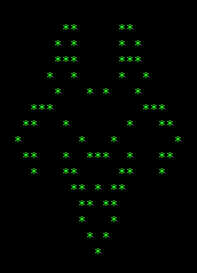
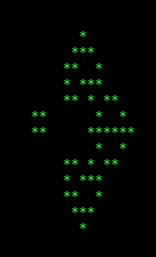
Another symmetrical pattern that shows an intermittent state of the cell colony before growing into something else, sometimes keeping the symmetrical pattern for a while, sometimes giving it up, sometimes even dividing into two or more colonies:
Some runs end up in static (still) patterns, in which the rule book does not allow for change anymore. The „block“ is a simple example:
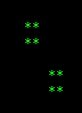
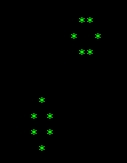
This snapshot shows two independent blocks, which will stay static until the game is interrupted. The „bee hive“ is another example for a static pattern:

Or the double bee hive:
More interesting are patterns that oscillate between two or more states. The following video shows a cell colony growing from a chaotic pattern into a „period 2 blinker“: https://janklingel.de/wordpress/wp-content/uploads/2026/07/2dlife-Oscillator-Blinker.webm.
Even more factinating is the next example. A cell colony grows from one chaotic pattern into the next, until finally ending in two static patterns and a „period 2 pulsar“: https://janklingel.de/wordpress/wp-content/uploads/2026/07/2dlife-Oscillator-Pulsar.webm.
As with the one-dimensional code, I kept my code very simple to understand and compact. The only function I added is gotoxy( ) to position the cursor on the screen of an ANSI terminal:
// gotoxy() - Position the cursor at x,y
int gotoxy(unsigned int x, unsigned int y) {
  if(x > 0 && y > 0)
    printf("%c[%d;%df", 27, y, x);
  return(0);
}
I probably could have used a macro for this, too. Note that this ANSI escape sequence expects first the line number starting with one, then the column starting with one. This is why y and x are swapped.
Instead of having two one-dimensional arrays I now have two two-dimensional arrays, one for the current generation, one for the next generation of cells:
char screenX[MAXX][MAXY]; // Current generation
char screenY[MAXX][MAXY]; // Next generation
We start with all cells being dead in both generations:
// Set the arrays to all cells dead
for(y=0;y<=MAXX;y++) {
  for(x=0;x<=MAXY;x++) {
    screenX[x][y] = DEAD;
    screenY[x][y] = DEAD;
  }
}
Then, random cells are being placed into the current generation screenX in a 5×5 matrix, right in the middle of the array (and therefore the screen):
// Seed initial group of cells (25) with random values
for(y=MAXY/2-2;y<=MAXY/2+2;y++) {
  for(x=MAXX/2-2;x<=MAXX/2+2;x++) {
    screenX[x][y] = rand() % 2; // Generate random 0s and 1s
    gotoxy(x,y);
    if(screenX[x][y] == 0) {
      screenX[x][y] = DEAD;
      putchar(DEAD);
    }
    else {
      screenX[x][y] = ALIVE;
      putchar(ALIVE);
      aliveS++;
    }
  }
}
The putchar( ) function puts the cell on the screen after the cursor has been positioned at the right place with gotoxy( ). In another loop the state of the eight neighbor cells of each cell screenX is determined:
    // Count neighbors of current cell X(x,y)
    aliveN = 0;
    if(screenX[x][y-1] == ALIVE) // North
      aliveN++;
    if(screenX[x+1][y-1] == ALIVE) // Northeast
      aliveN++;
    if(screenX[x+1][y] == ALIVE) // East
      aliveN++;
    if(screenX[x+1][y+1] == ALIVE) //Southeast
      aliveN++;
    if(screenX[x][y+1] == ALIVE) // South
      aliveN++;
    if(screenX[x-1][y+1] == ALIVE) // Southwest
      aliveN++;
    if(screenX[x-1][y] == ALIVE) // West
      aliveN++;
    if(screenX[x-1][y-1] == ALIVE) // Northwest
      aliveN++;
Followed by applying the rule book to the next generation cell screenY:
    // Apply rule book to Y(x,y)
    if(screenX[x][y] == ALIVE && aliveN < 2)
      screenY[x][y] = DEAD;
    else if(screenX[x][y] == ALIVE && (aliveN == 2 || aliveN == 3))
      screenY[x][y] = ALIVE;
    else if(screenX[x][y] == ALIVE && aliveN > 3)
      screenY[x][y] = DEAD;
    else if(screenX[x][y] == DEAD && aliveN == 3)
      screenY[x][y] = ALIVE;
    else
      screenY[x][y] = DEAD;
Lastly, the new generation cells screenY are being put on the screen, and the new generation is copied into the old generation:
// Draw new screen with next generation
n++;
alive = 0;
for(y=1;y<MAXY-1;y++) {
  for(x=1;x<MAXX-1;x++) {
    if(screenY[x][y] == ALIVE)
      alive++;
    gotoxy(x,y);
    putchar(screenY[x][y]);
    // Copy the new generation over to the old generation
    screenX[x][y] = screenY[x][y];
  }
}
The code for this version can be found at my GitHub page.